Introduction
This book assumes a basic knowledge of behavior trees.
The Beetry framework consists of three main components: a runtime, a plugin system, and an editor called Beehive.
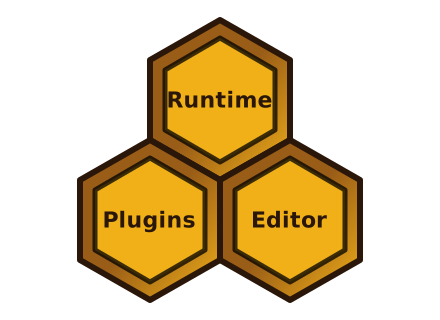
Each of these components provides its own functionality and extends the framework in a different way.
- The runtime provides the interfaces needed to define and execute a tree.
- The plugin system makes it possible to define and load trees, including custom tree-related types.
- The editor, Beehive, allows users to visualize and create trees.
All of these components can work independently, although the editor will most likely be used together with plugins. Knowing which components you need is the first step in deciding which features to enable.
In the following chapters, we take a closer look at each component.
Runtime
Runtime is the part of Beetry that turns a behavior tree from a structural model into an executable system.
To understand runtime, the first step is to understand how a tree is modelled: what kinds of nodes exist, how they are arranged in a hierarchy, and what role each node plays in the overall behavior.
Once that model is clear, the execution model explains how the tree is ticked over time, how nodes report their status, and how progress is coordinated through the tree.
Modelling Behavior
Behavior trees are structured as hierarchies of nodes. Non-leaf nodes define how execution flows through the tree, while leaf nodes perform checks or work.
In Beetry, nodes typically fall into four roles:
- control nodes, which decide how and when their children are ticked
- decorators, which wrap a single child and modify its behavior
- conditions, which evaluate a predicate
- actions, which perform work
Control nodes and decorators shape the structure and control flow of a tree. Conditions and actions sit at the leaves and provide the domain-specific logic for a particular use case.
Leaf behavior is introduced through two main contracts:
ConditionBehavior, which defines the logic evaluated by aConditionActionBehavior, which defines the logic executed by anAction
These contracts let applications inject their own behavior into the tree without changing the execution model itself. The next section explains how all of these node kinds participate in the same runtime model.
Execution Model
Beetry executes behavior trees by repeatedly ticking nodes until the tree reaches a terminal state. Every node participates in the same runtime model, which keeps execution predictable even when different node kinds have different roles.
What is a tick?
Execution in Beetry is centered around the Node interface. Every executable
node implements the same core lifecycle: it can be ticked, aborted, and reset.
tick is a single execution step in which the tree asks a node to make
progress and report its current state.reset clears any execution state so the node or subtree can start again from
a clean state.abort lets a node stop in-progress work when execution changes direction, for
example when a parent decides that a child should no longer be ticked.
This gives all node kinds a common runtime contract while still allowing them to behave differently during execution.
This contract is fully synchronous. The tree can execute correctly only if every
node implements it without blocking. If any node blocks during tick, it can
delay or stall execution of the whole tree.
Important
When implementing
Node, none of its methods should block.
The result of a tick is described by TickStatus:
Successmeans the node finished successfullyFailuremeans the node finished unsuccessfullyRunningmeans the node has started work that has not finished yet
When to tick?
Now that the idea of ticking and TickStatus is clear, the next question is
when ticks should happen. In many behavior tree systems, the tree is ticked
periodically, for example every 20 ms. In Beetry, the application selects the
ticking policy. Beetry exposes the Ticker interface so applications can define
their own tick source. Beetry provides PeriodicTick implementation that is the
default choice in many scenarios.
Action lifecycle
Actions often represent long-running work. That does not fit naturally into
the synchronous tick interface, which expects a node to return a result
immediately.
To bridge this gap, Beetry introduces an executor and task registration
interfaces. Action implements the Node interface, but internally it models
execution via a state machine. On the first tick, it uses the
user-provided ActionBehavior to create an ActionTask and register it with the
executor, which returns a task handle. On later ticks, Action uses that
handle to query the task status, or to abort the task if execution changes
direction.1
Once the task reaches a terminal state, Action returns to its idle
state and is ready to create a new task on a later tick.
Hooks
ActionBehavior provides hooks as part of its API. They are used to inject
non-blocking logic that should run depending on the current TickStatus.
This gives a synchronization mechanism between the background task and the action.
This also means a task status is not always the final action result. If the
task reports Success, but the action fails to complete the associated
hook call, the action is treated as failed for that tick.
Execution Flow
The following sequence shows the high-level interaction between an Action,
task registration, the executor, and a task handle.
sequenceDiagram
    actor User
    User ->>+ Action: tick()
    Action ->>+ RegisterTask: Register(ActionTask)
    RegisterTask ->>+ ExecutorConcept: Send(Task)
    create participant TaskHandle
    ExecutorConcept ->>+ TaskHandle: create
    ExecutorConcept -->>- RegisterTask: ok
    RegisterTask -->>- Action: ok
    Action ->>- User: TickStatus::Running

    User ->>+ Action: tick()
    Action ->>+ TaskHandle: query()
    TaskHandle -->>- Action: status
    Action -->> Action: call hook based on status
    Action -->>- User: status

    User ->>+ Action: abort()
    Action ->>+ TaskHandle: abort()
    TaskHandle ->>+ ExecutorConcept: abort()
    ExecutorConcept -->>- TaskHandle: aborted
    TaskHandle -->>- Action: TaskStatus::Aborted
    destroy TaskHandle
    Action ->> TaskHandle: drop

    Action -->> Action: on_aborted()

    Action -->>- User: status
This approach keeps the node interface synchronous and non-blocking, while still allowing long-running work to execute in the background. As a result, multiple leaf nodes can make progress concurrently.
Important
Because
Actionis scheduled on the executor and returnsRunningon the first tick, non-memory control nodes such asSequencemay restart earlier children on later ticks instead of resuming from the currently running one. In practice,Actionnodes should usually be combined with memory-based control nodes such asMemorySequence.
-
Aborting is currently implemented by sending an abort request through the task handle and then polling until the task reports a terminal status. See also Caveats. ↩
Node Library
Beetry provides a built-in library of generic nodes in the beetry-nodes
crate. When a particular node type is needed, it is a good idea to first check
whether it already exists there before implementing a custom one.
If a generic control node or decorator is missing, consider opening a pull request to add it to the shared library.
In most cases, implementing a node involves a few steps:
- Implement the
Nodetrait forYourNodeType. - Register
YourNodeTypeas a plugin. See the Nodes chapter for more details. - Re-export the node from the
beetrycrate.
Defining Tree
After introducing the execution model, the next step is to define a concrete tree in code and execute it.
As this is a 🐝 tree let’s model one of its behaviors.
Root
└── Sequence
    ├── DetectFlower
    ├── FlyTo
    └── CollectPollen
In code, this can be written as:
// Some parts of boilerplate code has been hidden, if you want to see all click
// Show hidden lines in the top right corner of the box

// This is only needed by mdbook to link the crates
extern crate tokio;
extern crate anyhow;
extern crate beetry;
use std::time::Duration;
use anyhow::{Result, anyhow};
use beetry::{
    leaf::{ActionBehavior, ActionTask, Task},
    node::{BoxNode, Root, MemorySequence},
    runtime::{PeriodicTick, PeriodicTicker, TickStatus, Tree, TreeEngine, TreeEngineConfig},
};
use tokio::sync::mpsc;
#[derive(Debug, Clone)]
struct Pose {
    x: f32,
    y: f32,
    z: f32,
}

struct DetectFlower {
    send: mpsc::Sender<Pose>,
}

impl ActionBehavior for DetectFlower {
    fn task(&mut self) -> Result<ActionTask> {
        Ok(ActionTask::new(DetectFlowerTask {
            send: self.send.clone(),
        }))
    }
}

struct DetectFlowerTask {
    send: mpsc::Sender<Pose>,
}

impl Task for DetectFlowerTask {
    async fn run(self) -> TickStatus {
        // detect flower dummy implementation
        if self
            .send
            .try_send(Pose {
                x: 1.3,
                y: 2.1,
                z: 0.7,
            })
            .is_err()
        {
            return TickStatus::Failure;
        }
        TickStatus::Success
    }
}

struct FlyTo {
    recv: mpsc::Receiver<Pose>,
}

impl ActionBehavior for FlyTo {
    fn task(&mut self) -> Result<ActionTask> {
        Ok(ActionTask::new(FlyToTask {
            pose: self.recv.try_recv().ok(),
        }))
    }
}

struct FlyToTask {
    pose: Option<Pose>,
}

impl Task for FlyToTask {
    async fn run(self) -> TickStatus {
        // fly to dummy implementation
        let Some(pose) = self.pose else {
            return TickStatus::Failure;
        };
        let _ = (pose.x, pose.y, pose.z);
        TickStatus::Success
    }
}

struct CollectPollen;

impl ActionBehavior for CollectPollen {
    fn task(&mut self) -> Result<ActionTask> {
        Ok(ActionTask::new(CollectPollenTask))
    }
}

struct CollectPollenTask;

impl Task for CollectPollenTask {
    async fn run(self) -> TickStatus {
        TickStatus::Success
    }
}

#[tokio::main]
async fn main() -> Result<()> {
    let engine = TreeEngine::new(TreeEngineConfig::default());
    let (send, recv) = mpsc::channel(1);
    let tree = Tree::new(Root::new(MemorySequence::new([
        Box::new(engine.register_action(DetectFlower { send })) as BoxNode,
        Box::new(engine.register_action(FlyTo { recv })) as BoxNode,
        Box::new(engine.register_action(CollectPollen)) as BoxNode,
    ])));

    let mut engine = engine.tree(tree).start_executor()?;
    let ticker = PeriodicTicker::new(PeriodicTick::new(Duration::from_millis(10)));
    let status = engine.tick_till_terminal(ticker).await?;
    Ok(())
}
The example already covers a lot. It uses ActionBehavior to define
custom action logic, Tree to define the hierarchy of nodes, and
TreeEngine to register action nodes and execute the tree.
There are a few things worth keeping in mind.
First, Beetry does not force a specific inter-node communication. In this
example, a Tokio channel is used to send and receiver Pose, but the same tree
could use a blackboard, shared state, or any other IPC-style mechanism if
desired.
Second, the shape of the tree is small, so its structure is easy to understand. Adding or removing one or two nodes is not a major problem at this scale. In practical applications, however, trees usually become much wider and deeper. Once that happens, reasoning about their structure in code becomes harder. In practice, trees of realistic size are usually designed in Beehive (see Beehive chapter for more details).
Using Beehive makes it easier to reason about a tree, at the cost of boxing nodes and slightly restricting the constructor API, since arbitrary data cannot be passed directly.
Plugins
Introduction
The plugin system is the mechanism that allows Beetry to be extended with user-defined types.
Extension Dimensions
At a high level, a plugin consists of:
- a specification, which tells the framework how to interpret and interact with a given plugin type
- a factory, which allows runtime values to be recreated during deserialization
Plugins can extend the framework in two dimensions:
- behavior, by defining a separate plugin type for each node type
- data flow, by defining message types and the channels that transport them
Registration and Usage
All plugins are registered at compile time. Each plugin must declare a unique identifier. Registering two plugins of the same type with the same identifier results in a runtime error. See Caveats for current limitations.
To make plugins available, the module in which they are defined must be brought into scope.
Constraints
As already briefly mentioned in the Defining Tree chapter plugin-based extensibility constrains the structure.
This introduces the following constraints:
- Inter-node communication that a node depends on has to be abstracted through an interface.
- Any additional data needed when creating a node has to be expressed in a structured way.
The following sections present the concrete solutions to these constraints.
Inter-Node Communication
Beetry uses explicit inter-node communication. For a comparison with other approaches and the rationale behind this decision, see Communication Methods Comparison.
Model
In Beetry nodes communicate through an opt-in system of typed messages and channels. A node declares its inputs and outputs, which become the API contract of the node.
This has the benefits:
- messages remain type-safe, with no need for type erasure
- data flow is explicit, which encourages more deliberate design
- dependencies are clear
- the editor can validate more of the tree structure before runtime
Communication in Beetry has two parts:
- messages, which define the typed values exchanged between nodes
- channels, which define how those values are delivered
This communication model is recommended, but not mandatory. Pub/sub frameworks can still be used internally when they better fit a particular use case, especially when widely shared data would otherwise require many explicit communication paths.
Messages
In Beetry, messages describe the data itself, not the way that data is transported. For example, a pose estimate, a trajectory, or a safety status can all be modeled as message types.
To be used as a Beetry message, a type must implement the Message
trait. In most cases this is done through the derive macro.
Recommended message types are:
- domain-oriented
- easy to understand without node-specific context
- reusable across multiple nodes
Once a message type exists, it can be exposed to the plugin system and paired with one of the supported channel kinds. In practice this usually means:
- define a domain type and derive
Messagefor it - register it in the plugin system with the
channel!macro
For example:
extern crate beetry;
use beetry::{
    Message,
    type_hash::{self, TypeHash},
};

#[derive(Debug, Clone, Copy, Default, TypeHash, Message)]
pub struct Pose {
    pub x: f32,
    pub y: f32,
}

beetry::plugin::channel! {PoseChannel: Pose}
Here, PoseChannel is the plugin type, and Pose is the message type the
channel will carry.
Channels
Channels define how messages are delivered between nodes.
In Beetry, channels are built on top of Sender and Receiver
traits. These traits define the minimal non-blocking interface needed for
communication between nodes.
This makes communication explicit in two ways:
- the message type describes the data contract
- the channel kind describes the delivery behavior
Providing multiple channel implementations matters because different kinds of data have different runtime needs. Some values should be queued, some should represent the latest known state, and some should be fanned out to multiple consumers.
See the channel library chapter for more details about the available channel types.
Data flow
Explicit communication is not only about what data flows through the tree, but also about when that flow is allowed to happen.
In Beetry, messages are propagated during ticks. This keeps communication synchronized with node execution, reset, and abort handling. If nodes could observe or publish arbitrary updates outside the tick-driven execution model, their internal state could become inconsistent with the tree lifecycle. In practice, that would make it much harder to reason about whether a value was produced before an abort or after a reset.
To avoid those issues, Beetry synchronizes message propagation with ticking. At
the same time, users can decide under which node statuses a particular message
is forwarded, preserving full flexibility. In the case of Action nodes, this
data flow is typically implemented through action
hooks.
This can introduce some boilerplate; see Caveats for more details.
Parameters
Nodes often need additional input at construction time.
To support this, Beetry defines two main design goals for such inputs:
- they must be serializable and deserializable, so they can survive persistence
- they must support validation, so incorrect values can be detected as early as possible
Beetry addresses this with parameters. Parameter values are described through typed field specifications, which can also attach optional validators for constraints beyond the basic value type.
This gives nodes part of the flexibility of ordinary constructors, but in a form that remains structured and inspectable by the framework.
Registration
A parameter is usually introduced by defining a deserializable Rust type, and
then implementing ProvideParamSpec for that type.
For the most up-to-date minimal example, check the ProvideParamSpec API docs
in the beetry::plugin module.
Nodes
With communication and parameters in place, we can now describe how nodes are exposed to the framework.
Beetry provides separate registration macros for each node kind:
action!condition!control!decorator!
Each macro defines the node name, publishes its metadata, and registers a factory that reconstructs the runtime node from its stored configuration.
For the most up-to-date minimal examples, check the API docs for
action!, condition!, control!, and decorator! in the
beetry::plugin module.
The registration DSL supports optional parameters for all node kinds. Leaf nodes can also declare typed communication ports during registration, which makes their inputs and outputs part of the node API.
Tip
If you are adding a generic reusable node, see the Node Library chapter for how to add it to the framework itself.
Channel Library
The built-in channel implementations live in the beetry-channel crate. It
contains all channel kinds currently supported by Beetry and provides the
delivery behaviors that can be exposed through channel plugins.
If your use case needs a different delivery model, contributions are welcome. Opening a pull request for a new channel kind is encouraged.
Note
At the moment, adding a new channel kind requires changes in several places, so it is best to get in touch first to coordinate the work.
Beetry currently provides the following channel kinds:
mpscwatchbroadcast
Selecting a channel
- use
mpscwhen messages should be processed one by one and every queued item matters - use
watchwhen only the latest value matters, such as status or sensor state - use
broadcastwhen the same message should be delivered to multiple receivers
Important
With
mpsc, keep in mind that once a sender successfully sends a message, aborting any intermediate node on the execution path might not clear the receiver buffer. In the worst case, stale messages can fill the bounded buffer and cause later sends to fail. To minimize this risk, the sender and receiver should ideally be neighboring nodes in the execution path.
Beehive
As briefly mentioned in the Defining Tree chapter, realistic behavior trees are usually created in Beehive rather than directly in code.
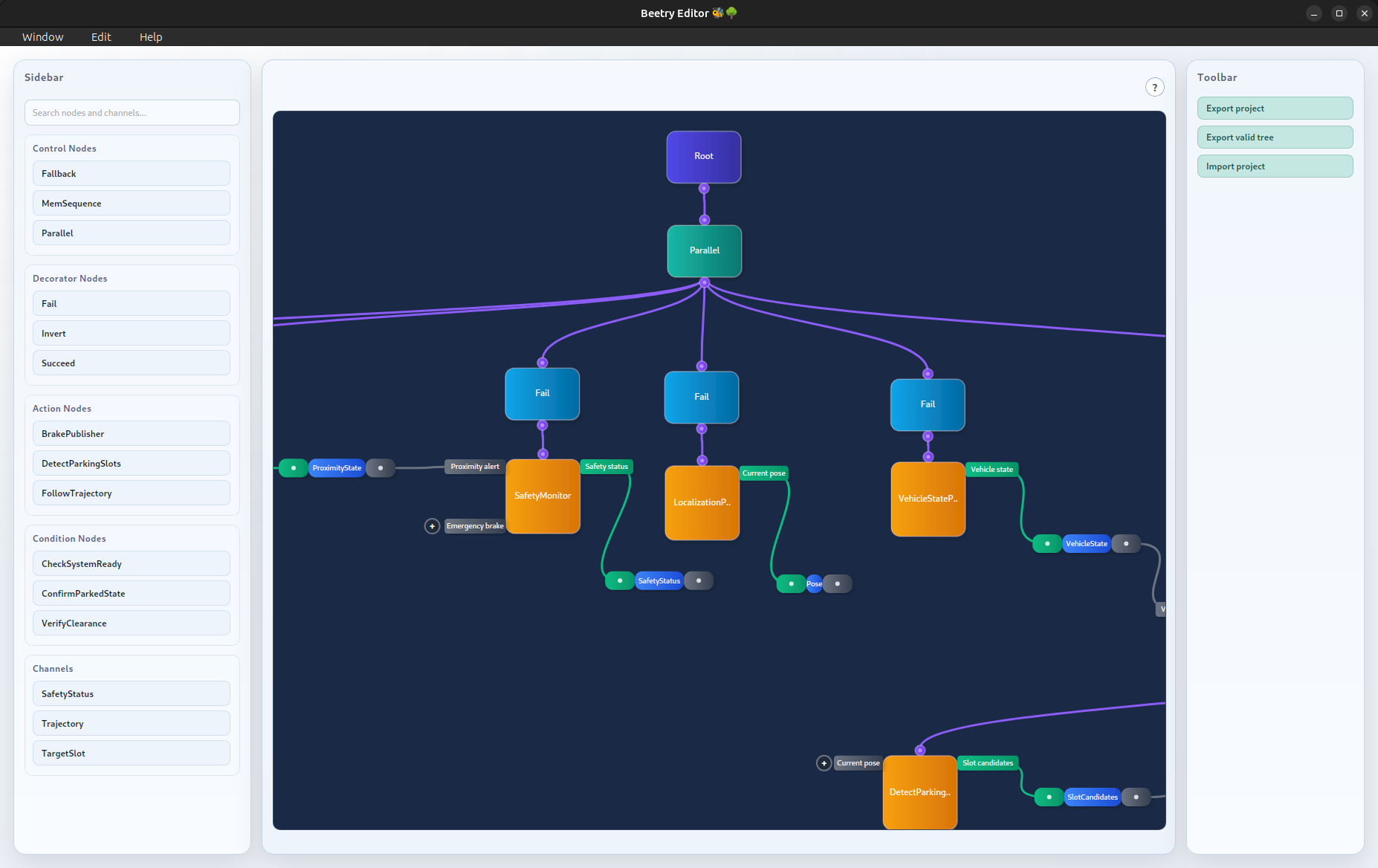
The following screenshot shows the Beehive layout at a glance:
Creating Elements
When designing a tree, the left sidebar shows the elements that can be created. This includes the available nodes and the messages that can be transported through channels.
At the top of the sidebar, a search bar can be used to filter the displayed elements and quickly find the one that is needed.
The following video shows how to navigate the sidebar, create nodes and channels, and provide node parameters.
Node parameters cannot be created with invalid values, so such errors are detected early rather than at tree execution time.
When you hover over an element, it shows at least the element ID. For nodes with parameters, the currently used parameter values are also shown.
Connecting Elements
Connecting nodes is as simple as clicking the output pin of a node and dragging it to the input pin of its child node.
Explicit inter-node communication is slightly more involved. First, a channel must be created for the message type that should be transported. Nodes that define input or output messages then expose corresponding ports. To create a connection, click a node port and attach it to the appropriate side of the channel.
This is also shown in the README demo video.
Navigating workspace
As a tree grows, it occupies more space in the workspace. To make this manageable, the workspace can be panned and zoomed.
In larger trees, channel edges may start to clutter the view. They can be hidden easily by clicking on them, which is also shown in the video below.
The following video shows basic workspace navigation.
Toolbar
On the right side of Beehive, there is a toolbar that provides actions for importing and exporting artifacts. When exporting, sibling child order is derived from horizontal placement in the workspace, that means children are ordered from left to right.
In the bottom-left corner, an error dialog reports invalid actions. When the user tries to export a tree, a validation check is performed. If the check passes, the artifact can be stored. Otherwise, the error dialog shows what is missing.
This workflow is also demonstrated in the second part of the README demo video.
For details about the exported data format, see Serialization Format.
Appendix
This section collects diagrams and other supplementary material that complement the main chapters of the book.
Artifacts
In Beetry, an artifact is any entity serialized by the editor and intended to be stored and loaded later, rather than edited manually.
Note
Although artifacts are serialized in a readable format, manual editing is done at your own risk.
Serialization Format
Beetry uses JSON to export project artifacts and validated tree artifacts. To
inspect the current schema, see the schema directory.
The schema will likely evolve in the future, but best efforts will be made to preserve backward compatibility.
Export Flow
The following diagram outlines how a validated tree is exported from the editor and later reconstructed into a runtime tree. Exporting a project artifact is very similar, except that the tree is not validated, which allows intermediate editor state to be stored as well.
flowchart TD
    subgraph PluginLayer["Plugin Layer"]
        NP[Node plugins]
        CP[Channel plugins]
        NS[(Node specs)]
        CS[(Channel specs)]
    end

    subgraph EditorLayer["Editor / Designing"]
        E[Editor project state]
        N[Configure nodes and parameters]
        C[Connect tree edges and channels]
    end

    subgraph ExportLayer["Export Pipeline"]
        EN[Export node store]
        EP[Export parameter store]
        EO[Export port store]
        EC[Export channel store]
        TS[(tree::Store)]
        VT{ValidTreeStore::try_from}
        OK[(ValidTreeStore)]
    end

    subgraph RuntimeLayer["Load / Reconstruction"]
        JD[JSON deserialize]
        TR[TreeReconstructor]
        RC[Reconstruct channels and nodes]
        RT[(Runtime Tree)]
    end

    NP -->|provides| NS
    CP -->|provides| CS
    NS --> E
    CS --> E

    E --> N
    N --> C

    C --> EN
    C --> EP
    C --> EO
    C --> EC

    EN --> TS
    EP --> TS
    EO --> TS
    EC --> TS

    TS --> VT
    VT -->|valid| OK
    VT -.->|invalid: structural/configuration errors| E

    OK -->|serialize to JSON| JD
    JD --> TR
    TR --> RC
    RC --> RT

    style PluginLayer fill:#3730a3
    style EditorLayer fill:#0f766e
    style ExportLayer fill:#047857
    style RuntimeLayer fill:#7c2d12
    style NS fill:#818cf8
    style CS fill:#818cf8
    style OK fill:#059669
    style RT fill:#ea580c
Inter-Node Communication
Comparison
This section compares the main approaches to inter-node communication in behavior trees.
Blackboard
The blackboard is one of the most commonly used data-sharing mechanisms in behavior tree frameworks. It provides a shared key-value store that allows nodes to exchange data with minimal infrastructure, making it both flexible and easy to implement.
However, this flexibility comes at a cost. Data dependencies between nodes become implicit: it is not clear from the tree definition which node produces a value or whether it is available when needed. In practice, ensuring correctness often requires analyzing the entire tree as well as individual node implementations.
Another issue is that nodes become coupled through shared keys rather than explicit interfaces. This makes refactoring more error-prone and reduces modularity. Since values persist in the blackboard, nodes may also read outdated data, introducing temporal coupling. Additionally, when multiple nodes write to the same entry, ownership is unclear and later writes may silently overwrite earlier ones.
BehaviorTree.CPP mitigates some of these issues by introducing input and output ports, which make data dependencies more explicit and improve readability. However, ports are still backed by the blackboard, and certain issues remain. In particular, while ports are typed at the node interface, some type mismatches may only be detected at runtime when values are accessed.
Finally, in trees that allow parallel execution, for example through a
Parallel node, synchronizing concurrent access can be difficult and may
impose an additional runtime penalty.
Pub/Sub
Like a blackboard, a pub/sub framework allows nodes to exchange data through shared infrastructure instead of direct references. Unlike a blackboard, however, pub/sub is message-oriented rather than state-oriented: publishers emit values to topics or channels, and subscribers receive them asynchronously, instead of reading and writing persistent entries in a shared store.
However, pub/sub frameworks often introduce framework-level coupling. For nodes to communicate with each other, they usually need to use the same concrete pub/sub implementation, or compatible client objects derived from it. As a result, communication is decoupled at the node level, but tied to a specific messaging framework at the system level.
Another drawback is a runtime cost. Many pub/sub frameworks are built on IPC or networking mechanisms, which means messages often have to be serialized and deserialized before delivery.
Explicit
In an explicit communication model, data flow is expressed through defined producer-consumer interfaces. Dependencies are visible by design, and communication becomes part of the component API instead of an implementation detail.
This improves modularity and makes API boundaries clearer. It is easier to see which node produces a value, which node consumes it, and how data moves through the system. Because communication contracts are explicit, refactoring is safer and more of the system can be validated before runtime.
However, this clarity comes at the cost of additional structure. Explicit communication requires more upfront design and more supporting infrastructure. When the same data has to reach many nodes, the number of communication paths can also make interfaces more verbose.
Another tradeoff is that communication paths become part of the API. Adding or removing them may require changes in the affected nodes. On the other hand, this also makes such changes explicit and allows the compiler to enforce consistency between producers and consumers.
Caveats
Runtime
Action abort
Action abort is currently implemented as a blocking operation. Beetry sends an abort request through the task handle and then polls until the task reports a terminal status.
In practice this means aborting multiple running nodes is currently handled sequentially. Beetry sends the abort request, waits until node reports a terminal status, and only then continues to the next one.
Plugins
Message propagation
When Action nodes participate in inter-node communication, data
is produced by the background task and then forwarded via action
hooks. This keeps message propagation synchronized with ticking, but it can
introduce some boilerplate to implement such propagation.
Beetry does not enforce a single propagation policy here, because the right semantics depend on the use case and on the meaning of the message. This preserves flexibility, but it also means users must decide when values should be propagated and when receiver queues should be cleared.
Duplicate identifiers
Each plugin type must declare a unique identifier. For example it is totally fine to have control and decorator node with the same name, but two control nodes with the same name are not supported.
If two plugins of the same type use the same identifier, the conflict is currently detected at runtime rather than at compile time.